Deployment Strategy
This document outlines the comprehensive deployment strategy for the Stakeholder Agent System using GitHub Actions, Docker, and Google Cloud infrastructure.
Overview
The deployment strategy supports the system’s multi-tier architecture:
- Frontend: TypeScript/TanStack Start application
- Backend: Python/FastAPI/Pydantic AI service
- Database: Neon Postgres (managed service)
| Component | Containerization | Orchestration | Registry |
|---|---|---|---|
| Frontend | Docker | Google CloudRun | Google Artifact Repository |
| Backend | Docker | Google CloudRun | Google Artifact Repository |
| Database | Managed | Neon | N/A |
Docker Configuration
Backend Dockerfile
# ai-backend/Dockerfile
# 1: Build Stage
FROM ghcr.io/astral-sh/uv:0.10.6-python3.14-trixie-slim@sha256:afdc829233119f8bb7ffc68839aaac57b3a4eda72947b2317ad218138fbd955a AS builder


WORKDIR /app

# Enable bytecode compilation and use copy link mode for performance
ENV UV_COMPILE_BYTECODE=1
ENV UV_LINK_MODE=copy

# Install dependencies first (cached layer)
RUN --mount=type=cache,target=/root/.cache/uv \
    --mount=type=bind,source=uv.lock,target=uv.lock \
    --mount=type=bind,source=pyproject.toml,target=pyproject.toml \
    uv sync --frozen --no-dev --no-install-project

# Copy source and install project (cached layer)
COPY . .
RUN --mount=type=cache,target=/root/.cache/uv \
    uv sync --frozen --no-dev


# 2: Run Stage
FROM ghcr.io/astral-sh/uv:0.10.6-python3.14-trixie-slim@sha256:afdc829233119f8bb7ffc68839aaac57b3a4eda72947b2317ad218138fbd955a AS runner

WORKDIR /app

# Copy virtual environment from builder
COPY --from=builder /app/.venv /app/.venv

# Copy application code (cached layers)
COPY --from=builder /app/src /app/src
COPY --from=builder /app/data /app/data
COPY --from=builder /app/alembic /app/alembic
COPY --from=builder /app/alembic.ini /app/alembic.ini
COPY --from=builder /app/README.md /app/README.md

# Set environment variables
ENV VIRTUAL_ENV=/app/.venv
ENV PATH="/app/.venv/bin:$PATH"
ENV PYTHONUNBUFFERED=1

# Create non-root user
RUN addgroup --system appgroup
RUN adduser --system --ingroup appgroup appuser

# Fix file ownership for runtime paths
RUN chown -R appuser:appgroup /app

USER appuser

EXPOSE 8000

# Start FastAPI app with uvicorn
CMD ["uvicorn", "src.main:app", "--host", "0.0.0.0", "--port", "8000"]
Frontend Dockerfile
# ai-frontend/Dockerfile
# Stage 1: Builder
FROM node:24-alpine AS builder

WORKDIR /app

COPY package.json package-lock.json ./
RUN npm ci

ARG VITE_NEON_AUTH_URL

COPY . .
RUN npm run build

# Stage 2: Runner
FROM node:24-alpine AS runner

WORKDIR /app

RUN addgroup --system --gid 1001 nodejs && \
    adduser --system --uid 1001 --ingroup nodejs appuser

COPY --from=builder /app/.output ./.output

ENV NODE_ENV=production

USER appuser

EXPOSE 3000

CMD ["node", ".output/server/index.mjs"]
Continuous Deployment Strategy
Each component’s CI/CD pipeline, orchestrated in GitHub Actions, terminates by publishing updated container images to the Google Artifact Registry, which in turn allows Google Cloud Run to launch the updated image.
Services
| Service | Purpose | Configuration |
|---|---|---|
| Google Artifact Registry | houses container Images | native platform service |
| ai-frontend | front-end application | Docker container |
| ai-service | back-end service | Docker container |
| Neon Postgres DB | database | managed service |
| Neon Auth | authentication | managed service |
IAM Roles
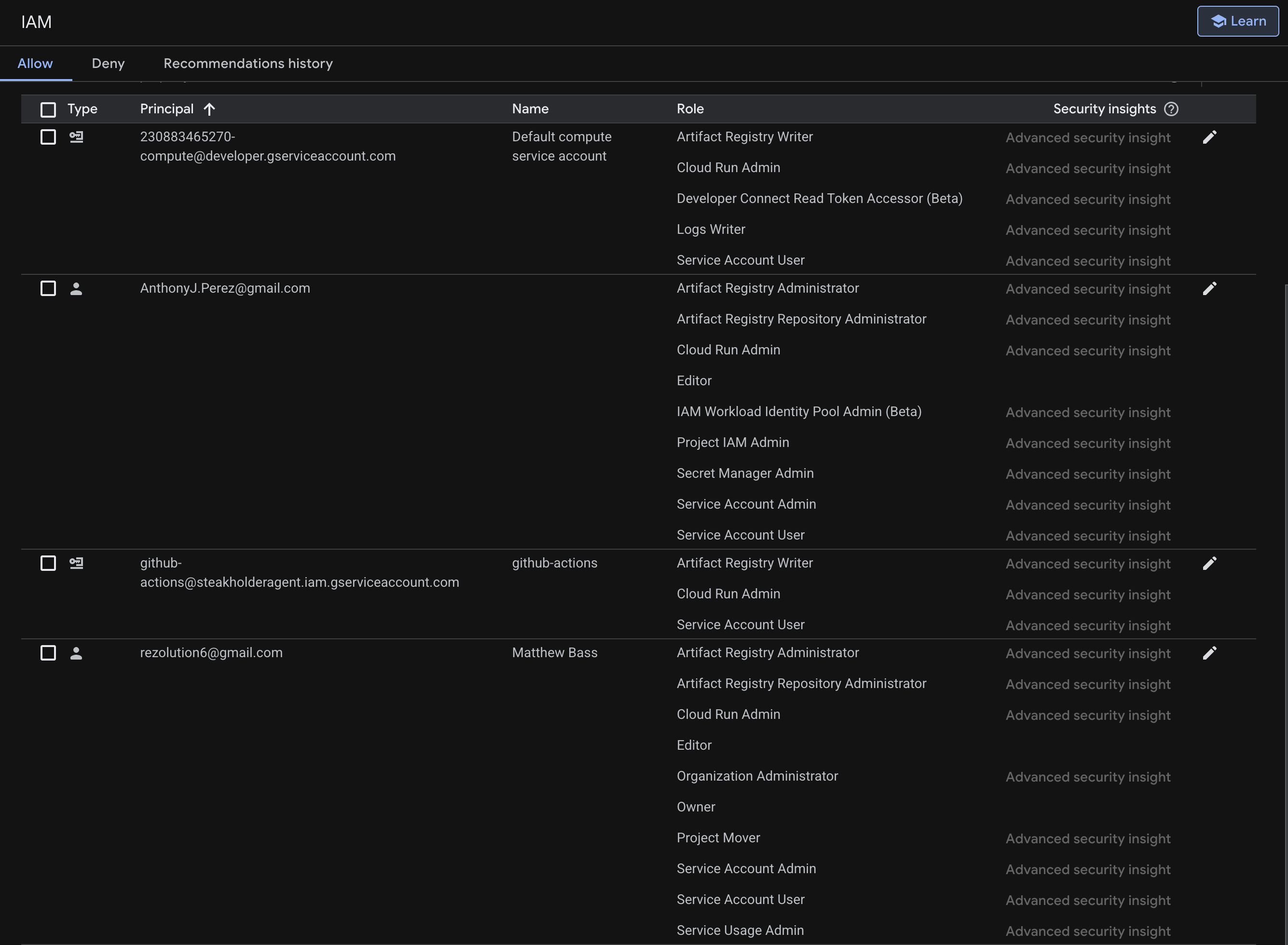
Thus far 2 developers and 2 services have needed to be assigned IAM roles to implement the continuous delivery. Here we document what roles the Technical Lead Anthony Perez, the organization Owner Matthew Bass, and the 2 systems (Google Cloud Run, GitHubActions) required to enable continuous deployment.
Pipeline Stages
The CI/CD pipeline is initiated when a Pull Request is created.
| Stage | Actions | Triggers |
|---|---|---|
| CodeRabbitAI | review code | Pull request creation |
| Team review | human review of code | CodeRabbitAI run |
| Approve/Merge PR | Manual approval for merge | Team review complete |
| Lint | Linting (ruff, Biome) | Merge to main |
| Type check | Type-checking (MyPy, back-end only) | All branches |
| Test | Unit/Integration Tests (pytest, vitest) | All branches |
| Docker build | Build and push images | Testing passes |
| Deploy to cloud | Deploy to Google Artifact Registry | Build successful |
| Google Cloud Run | Runs container | Push to GAR |
Environment Variables
Backend Service
| Variable | Description | Source |
|---|---|---|
| DATABASE_URL | Neon Postgres connection | Secrets Manager |
| AI_PROVIDER_API_KEY | LLM provider API key | Secrets Manager |
| AI_PROVIDER_BASE_URL | dev/staging/production | Secrets Manager |
| AI_PROVIDER_MODEL | Logging verbosity | Secrets Manager |
| AUTH_URL | Neon Auth URL | Secrets Manager |
Frontend Service
| Variable | Description | Source |
|---|---|---|
| DATABASE_URL | Neon Postgres connection | Secrets Manager |
| NODE_ENV | Node environment | Secrets Manager |
| VITE_AI_SERVICE_BASE | service confoguration | Secrets Manager |
| VITE_NEON_AUTH_URL | Auth confoguration | Secrets Manager |
| VITE_API_URL | Port configuration | Secrets Manager |
| VITE_AUTH_DOMAIN | Auth domain | Secrets Manager |
Related Documentation
| Topic | Document |
|---|---|
| System architecture | Architecture |
| Technology decisions | Technology Stack |
| Development workflows | Development Workflows |
| Testing practices | Testing Strategy |
| API reference | API Documentation |
Other Resources
- GitHub Repository
- TanStack Documentation
- FastAPI Documentation
- React Documentation
- TypeScript Documentation
- Python Documentation
- SQLAlchemy Documentation
- Alembic Documentation
- PostgreSQL Documentation
- Pytest Documentation
- Vitest Documentation
- Biomes Documentation
- Ruff Documentation
- MyPy Documentation
- GitHub Actions Documentation
- Pydantic Documentation
- Pydantic AIO Documentation
- Google Cloud Platform Documentation
- Google Cloud Run Documentation
- Google Artifact Registry Documentation
- Neon Documentation